

Why Your Sales Team Ignores the CRM (and How to Fix CRM User Adoption)
CRM user adoption fails because the system is designed for reporting, not for selling. Reps ignore a CRM when logging a call costs more time than making one, when the fields exist to feed management dashboards, and when the data they get back is wrong. Fix the design and adoption follows.
Every few months a founder tells us the same story. They bought licences for 25 or 40 seats, ran a training session, and three months later the pipeline review still runs off a spreadsheet one person maintains by hand. Nobody is lazy. The sales team is doing exactly what the incentives tell them to do: close deals, and spend as little time as possible on anything that does not close deals.
This post is about the design decisions that decide whether a CRM gets used. It covers the published evidence on where selling time actually goes, what per seat software costs in India, nine changes that move adoption, and a 90 day rollout that does not rely on nagging.
Why CRM user adoption fails: six patterns
We have rebuilt or replaced enough sales systems to see the same six patterns repeat. None of them is a training problem, which is why another round of training rarely changes CRM user adoption.
| Pattern | What the rep experiences | What it actually is |
|---|---|---|
| The form is longer than the conversation | Fourteen mandatory fields after a two minute call | Reporting requirements pushed onto the person with the least time |
| Nothing comes back | Data goes in, nothing useful comes out | No reciprocity in the design, so logging feels like surveillance |
| It is not where the work happens | Calls on the phone, chats on WhatsApp, notes in the CRM later or never | The system of record is separate from the system of work |
| The queue is someone else’s opinion | A score or priority the rep cannot see the reasoning behind | Opaque automation, so reps build their own shadow list |
| Duplicates everywhere | The same lead under 98765 43210 and +919876543210 | No normalisation on the one identifier Indian sales actually uses |
| Admin reviews the CRM, not the work | Pipeline meeting becomes a data entry audit | The tool became a compliance instrument |
Notice that five of the six are decisions made during configuration or build. Only the last is a management habit. That is the useful news: most of this is fixable in the product.
The time cost nobody budgets for
The selling time problem is well documented. In the sixth edition of its State of Sales research, based on a double anonymous survey of 4,050 sales professionals across 22 countries fielded in August and September 2025, Salesforce reports that the average seller spends 40 percent of their time selling. Gen Z reps come in lower at 35 percent, and lose roughly two full hours every week to manual data entry alone.
Run that against a 30 person sales team. Two hours a week per rep is 60 hours a week across the team, or about 2,880 hours a year before leave. At any reasonable loaded cost for a sales executive in Delhi NCR, that is a meaningful line item, and it buys you data your managers do not trust. The point is not that logging should be abolished. The point is that every mandatory field is a purchase, and most teams never price it.
A practical test before you add a field: can you name the decision that field will change, and the person who will make it? If you cannot, the field is costing selling hours for nothing.
When the data stops being trusted
Poor CRM user adoption and bad data feed each other. Reps skip fields, so reports go wrong, so managers stop relying on reports, so nobody enforces the fields, so more get skipped.
Validity surveyed 1,241 CRM administration staff in the United States, United Kingdom and Australia in late 2021 for its State of CRM Data Management report. The findings are old enough that you should treat them as direction rather than current measurement, but the direction is stark: 91 percent said the data requested for key decisions is inaccurate at least occasionally, and 44 percent estimated their company loses more than 10 percent of annual revenue to poor quality CRM data. Ninety five percent said data quality problems seriously impair their ability to use the CRM fully.
That last number is the one to sit with. The data problem is not downstream of the adoption problem. It is the same problem, measured at the other end.
Nine design fixes that lift CRM user adoption
These are the changes that have moved the needle on the sales systems we have built. They are ordered by how much they typically return for the effort.
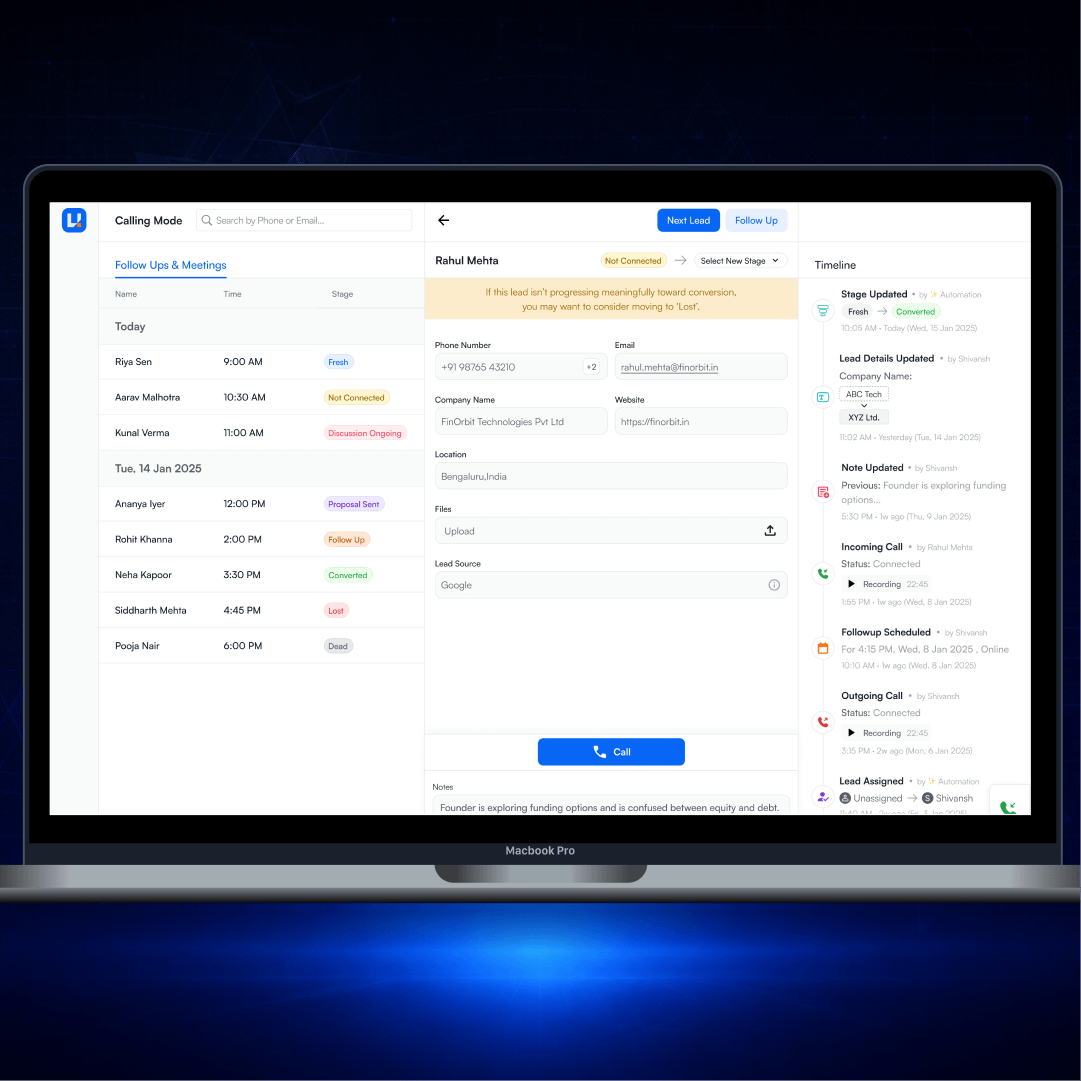
- Build a calling mode, not a database. Give the rep one screen with the next lead, the history, and a call button. In UNA-CRM, the minimalist calling CRM we built, the agent works one lead at a time: follow ups on the left, the lead detail in the middle, a timeline of every call, note and stage change on the right. Nothing else competes for attention.
- Log automatically, confirm manually. Call connected or not, duration, recording, timestamp and who did it should all be captured by the system. The rep’s only job is the one thing software cannot infer: what the person said and what happens next.
- Cut mandatory fields to the ones that gate a stage change. If a field is not required to move a deal forward, it is optional. Most teams can get from fourteen required fields to four.
- Make stages mean something a rep can verify. Fresh, Not Connected, Discussion Ongoing, Proposal Sent, Follow Up, Converted, Lost and Dead are stages a rep can assign without guessing. Percentage probabilities are not.
- Normalise the phone number at write time. In India the mobile number is the primary key whether you planned it that way or not. Strip spaces, handle the leading zero, store in E.164, and check for duplicates before the record is created, not in a quarterly cleanup.
- Give something back on every screen. The next best lead, the last three notes, a nudge when a deal has gone quiet. Reciprocity is what separates a tool from a timesheet.
- Meet the team on the channel they sell on. If deals move on WhatsApp and calls, then WhatsApp and calls belong in the timeline. A CRM that only knows about email is blind to most Indian B2B and nearly all B2C.
- Make automation legible. When the system changes a stage or assigns a lead, show that it did and why. Opaque scoring is the fastest way to lose a sales floor, which is why the rules behind a lead score need to be inspectable by the people working the queue.
- Design the manager view to read work, not compliance. If the pipeline meeting runs off call recordings and timeline activity rather than field completeness, reps stop filling fields defensively and start recording reality.
One more constraint worth designing around early: a CRM holds personal data of identifiable people, which brings it inside the Digital Personal Data Protection Act, 2023. Purpose limitation, retention and the ability to delete a data principal’s records are architecture decisions, not a settings page you add later.
Off the shelf or custom: what each costs per seat in India
Adoption and cost are connected, because teams who dislike a tool still pay for every seat of it. Here is what the vendors publish. Zoho quotes in rupees for India. Salesforce quotes its India page in US dollars.
| Product and edition | Published list price, per user per month | Billing note |
|---|---|---|
| Zoho CRM Standard | ₹800 | Taxes extra |
| Zoho CRM Professional | ₹1,400 | Taxes extra |
| Zoho CRM Enterprise | ₹2,400 | Taxes extra |
| Zoho CRM Ultimate | ₹2,600 | Taxes extra |
| Salesforce Sales Cloud Core | US$195 | Billed annually |
| Salesforce Sales Cloud Advanced | US$395 | Billed annually |
| Salesforce Sales Cloud Max | US$550 | Billed annually |
Prices as published on the Zoho CRM India pricing page and the Salesforce India Sales Cloud pricing page at the time of writing. Check both before you budget, since list prices move and enterprise deals are negotiated.
The arithmetic matters more than the rate card. Thirty seats on Zoho Professional is ₹5,04,000 a year before tax. Thirty seats on Enterprise is ₹8,64,000. Thirty seats on Salesforce Sales Cloud Core is US$70,200 a year at list. Add implementation, an admin, and the integration work, none of which is in those numbers.
Custom is not automatically cheaper, and we say so to clients who ask. It becomes the better economics when the recurring licence line is large, when your workflow is genuinely unusual, or when the standard product forces process changes your team will not accept. We have broken down both sides of that decision in our framework for choosing custom CRM versus off the shelf, and the build side numbers in our guide to CRM development cost in India.
Measuring CRM user adoption without fooling yourself
Most adoption dashboards measure logins, which measures nothing. A rep who opens the CRM every morning and does the real work elsewhere scores perfectly. Measure the behaviours that only happen when the system is genuinely in the workflow.
| Metric | What it tells you | Healthy signal |
|---|---|---|
| Same day activity logging | Whether the CRM is used during work or reconstructed afterwards | The large majority of activities logged on the day they happened |
| Share of calls initiated inside the system | Whether the tool is the work surface or a filing cabinet | Rising month on month after rollout |
| Stage changes per deal | Whether the pipeline reflects movement or gets updated before reviews | Spread through the week, not clustered on review day |
| Duplicate rate on new leads | Data hygiene at the point of entry | Falling and low, enforced at write time |
| Fields filled beyond the mandatory set | Whether reps see value in the record | Voluntary notes appearing without prompting |
Watch the clustering metric in particular. If stage changes spike every Friday afternoon, the CRM is being populated for the meeting, and your forecast is a work of fiction written weekly.
A 90 day rollout for an Indian sales team
| Phase | Focus | What good looks like at the end |
|---|---|---|
| Days 1 to 15 | Sit with three reps through a full day of calls. Record what they actually do, including the WhatsApp threads and the paper diary. | A written map of the real workflow, not the one in the process document |
| Days 16 to 40 | Build or configure the calling workflow and the four mandatory fields. Automate call logging. Normalise phone numbers. | A rep can run a full day inside the system without leaving it |
| Days 41 to 60 | Pilot with one team. Fix friction weekly. Do not add reporting fields yet. | Pilot reps asking for access for their colleagues |
| Days 61 to 80 | Roll out wider. Move pipeline reviews onto the system’s own timeline and recordings. | Managers stop asking for the spreadsheet |
| Days 81 to 90 | Add the reporting fields you still believe in, one at a time, each with a named decision it serves. | Reporting that reconciles with what reps know |
The sequence is what protects CRM user adoption. Teams that start with the reporting requirement and work backwards to the rep almost always end up with the spreadsheet running alongside. Teams that start with the rep’s day and add reporting last tend to keep it.
Getting it built
If your sales team is working around the CRM rather than in it, the fix is usually a design problem with a clear scope: shorten the path from lead to logged call, make the system give something back, and stop measuring compliance. That work is measured in weeks, not quarters.
We build sales systems for teams in Delhi NCR and across India, from a calling workflow on top of what you already own to a full replacement. If you want a second opinion on why yours is not being used, talk to our CRM development team and bring one week of your own pipeline data with you.
[…] The same failure shows up across the whole system, which is why we wrote a separate piece on why sales teams ignore the CRM and how to fix CRM user adoption. Our wider view on making a CRM the system of record rather than a reporting chore is in how […]